
Android entitlement for one PC
Pro or an active shared trial on Android is required. Free is insufficient; entitlement is checked through the confirmed device connection.
BauDoku Office for Windows is being prepared and is not publicly available yet. The office features described show the development version; no Windows download or Store release is offered here yet. The planned Windows version requires BauDoku Mini on Android with verified Pro entitlement or an active shared trial. Android Free cannot activate Office. One Windows PC may be active per entitlement. Creating or editing reports and exporting PDFs or data remain locked without activation.
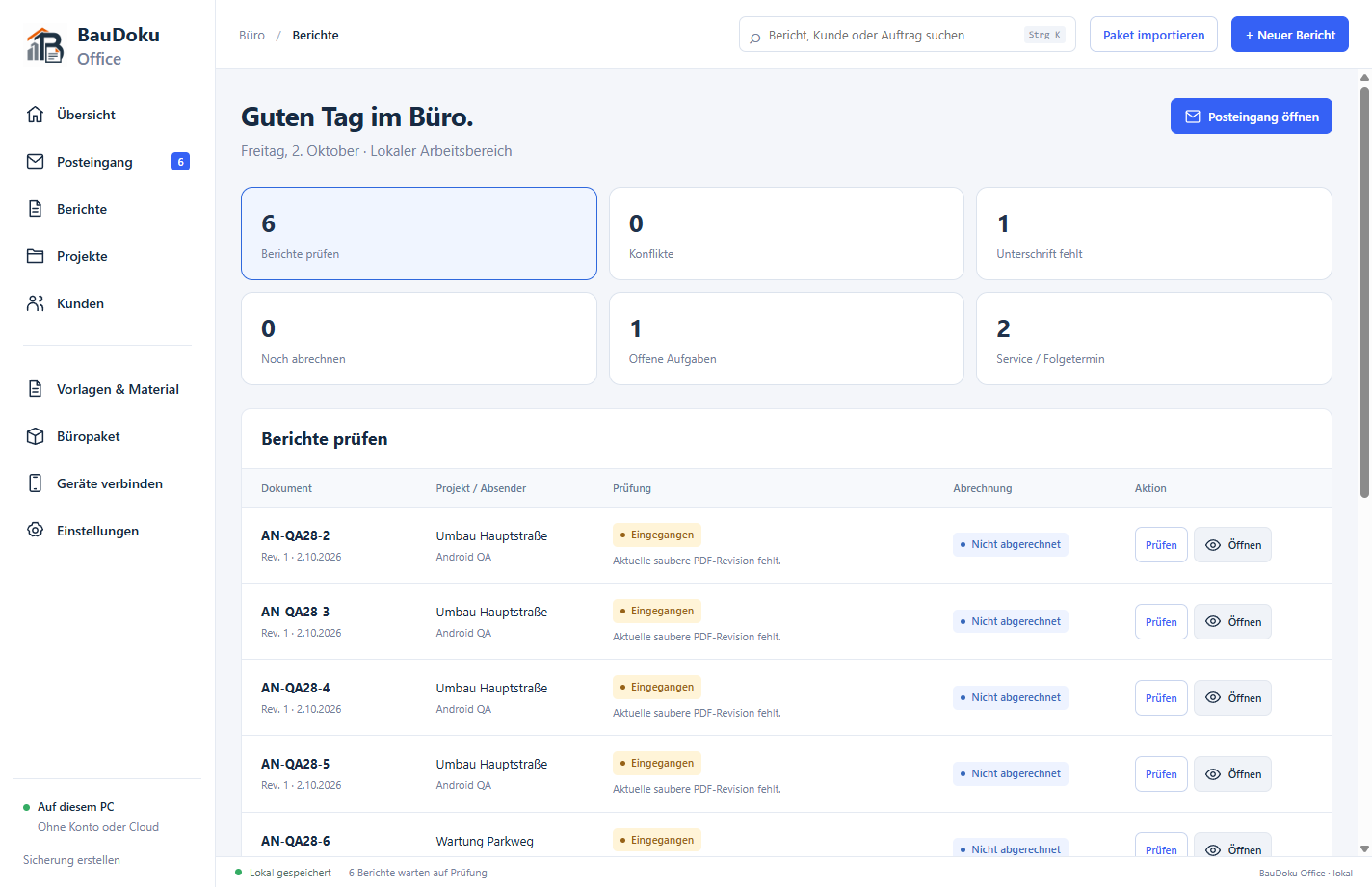 Windows Office – office overview with sample data
Four example views show the development version of the Windows companion, which is not publicly released yet: report creation on the PC, project files and office review. Use requires activation through Android with verified Pro or an active shared trial. Transferring selected business files is optional; Android entitlement is a prerequisite.
Record work, working time and materials directly on the PC. The PDF preview helps you check the report before exporting it.
Example view using synthetic data; interface in German.
Reports, documents and equipment belong to the same project. The project file keeps this information together for the next visit or office review.
Example view using synthetic data; interface in German.
The office overview brings together open work, pending reviews and internal tasks. Check the current report revision before approving it.
Example view using synthetic data; interface in German.
Choose Atlas, Klassik or Kontor and check your company header and logo in the sample preview. Save the PDF settings for documents generated afterwards.
Example view using synthetic data; interface in German.
BauDoku Office for Windows is being prepared and is not publicly available yet. The office features described show the development version; no Windows download or Store release is offered here yet. Windows entitlement cannot outlast the Android entitlement. An annual term does not permit a year without checks: activation and renewal need internet, with a new check no later than every 24 hours and again during connected Android data exchange. Replacing the PC revokes the previous activation; an offline PC can remain unlocked only until its previously issued entitlement expires.
Pro or an active shared trial on Android is required. Free is insufficient; entitlement is checked through the confirmed device connection.
Atlas, Klassik and Kontor, company logo, header/footer and photo layouts with preview and explicit save.
Receive Android packages or import ZIPs, assign sources and review conflicts while keeping original PDFs.
Offer selected master data to an approved Android device. The recipient reviews and confirms the import.
Manage Android reports and locally created documents using the existing report types.
Preserve originals, record changes as new versions and tie approvals to specific content.
Compare differences in work details, photos, hours and materials, and classify them as authoritative, excluded or separate work.
Record invoice status, number and date, along with internal notes, the person responsible and due dates, locally.
Assign customer/project numbers, file reports and consolidate records including equipment and attachments.
Summarise hours and materials by employee, project and week; internal hourly rates are optional.
Create PDF packages with a cover sheet, CSV files, PDF ZIPs and local email drafts with a revision-specific handover history. The draft is not sent.
In the planned Windows version you choose the folder, password and interval: every 1–168 hours, for example every 3 hours, daily or weekly. The first backup is complete; subsequent backups store new or changed files, with periodic new full bases. Automatic backup runs only while the app is open and is disabled initially.
Use the office overview with filters and outstanding tasks to plan the next work.
Open saved PDFs page by page and zoom in; adjust the company header and PDF settings locally.
In the planned Windows version select a project or customer and export available current and historical PDFs, photos, signatures, evidence and project attachments with CSV and a manifest. You explicitly select the contents and destination; missing PDFs are not generated automatically.
Native MEA Support chat and access to BauDoku help articles are already integrated in the Windows version, which is not publicly released yet. Support needs internet; articles open in your browser.
Open the BauDoku help centre from the app for instructions on reports, PDFs, projects, export and backup. Articles open in your browser.
BauDoku Office for Windows is being prepared and is not publicly available yet. The office features described show the development version; no Windows download or Store release is offered here yet.
Connect Android using the displayed connection address and confirm the comparison code on the PC. Scanning a QR code is an optional input aid. After the first confirmed connection, Android entitlement is checked for the PC; a separate licence QR activation is not planned.
After the confirmed connection, Pro or the active shared trial is verified. Office functions unlock only with valid Windows entitlement.
After valid activation, send selected Android reports over a reachable LAN or VPN connection. Report transfer and licence checks remain separate; business files are not sent to the licence server.
Android for field work. The Windows companion is being prepared and requires an entitled Android app; it is not offered for standalone use without Android.
| Feature / area | Android | Windows |
|---|---|---|
| Eight report types | Create on site and continue drafts | Create or import after Android activation (in preparation) |
| Time and materials | Structured rows, breaks and templates | Record, review and analyse by project or worker |
| Photos, checklists and measurements | Capture evidence and explanations | Edit in reports and manage in project files |
| PDF appearance | Atlas, Klassik, Kontor; logo and layout | The same three styles, company header and PDF preview |
| Review and office tasks | Reports and saved PDF revisions | Revision-specific approval, conflicts and internal tasks |
| Report transfer | Explicitly send selected packages | Start and confirm reception, or import ZIPs |
| Office customers and projects | Review the preview and confirm import | Prepare selected master data for a device |
| Backup | Manual ZIP export and confirmed restore | Manual ZIP copy; optional rotating local copies |
BauDoku Office for Windows is being prepared and is not publicly available yet. The office features described show the development version; no Windows download or Store release is offered here yet. Windows entitlement cannot outlast the Android entitlement. An annual term does not permit a year without checks: activation and renewal need internet, with a new check no later than every 24 hours and again during connected Android data exchange. Replacing the PC revokes the previous activation; an offline PC can remain unlocked only until its previously issued entitlement expires.
No. The planned Windows version is activated through the entitled Android app. Without Android Pro or an active shared trial, creation, changes and export remain locked. Office is not publicly released yet.
Windows can prepare selected customers and projects for a paired Android device. Android shows a preview and imports the data only after you confirm. Returning edited Windows report revisions is currently unsupported.
No. The optional receiver runs locally on the PC. There is no cloud server, automatic device discovery or automatic transfer.
Use the connection address for data exchange; the QR code is optional. The phone and PC need a reachable LAN or VPN route. Licence activation and renewed checks need internet; offline entitlement lasts no more than 24 hours and never beyond Android entitlement expiry.
A suitable Windows PC and BauDoku Mini on Android with verified Pro or an active shared trial. Final system requirements will be published with the protected Windows version.
The portable Windows x64 package requires the WebView2 Runtime. The distribution is unsigned and currently has no installer.
BauDoku Office for Windows is being prepared and is not publicly available yet. The office features described show the development version; no Windows download or Store release is offered here yet.
BauDoku Office for Windows is being prepared and is not publicly available yet. The office features described show the development version; no Windows download or Store release is offered here yet.
Connect Android using the displayed connection address and confirm the comparison code on the PC. Scanning a QR code is an optional input aid. After the first confirmed connection, Android entitlement is checked for the PC; a separate licence QR activation is not planned.
After valid activation, send selected Android reports over a reachable LAN or VPN connection. Report transfer and licence checks remain separate; business files are not sent to the licence server.
Step-by-step guides for Android, Windows, PDFs, device connections and backups — in the same help center as the support chat.